Incoming Links vs Backlinks: What Each Term Actually Means
By Michael Carter
Filed under: SEO & Link Building
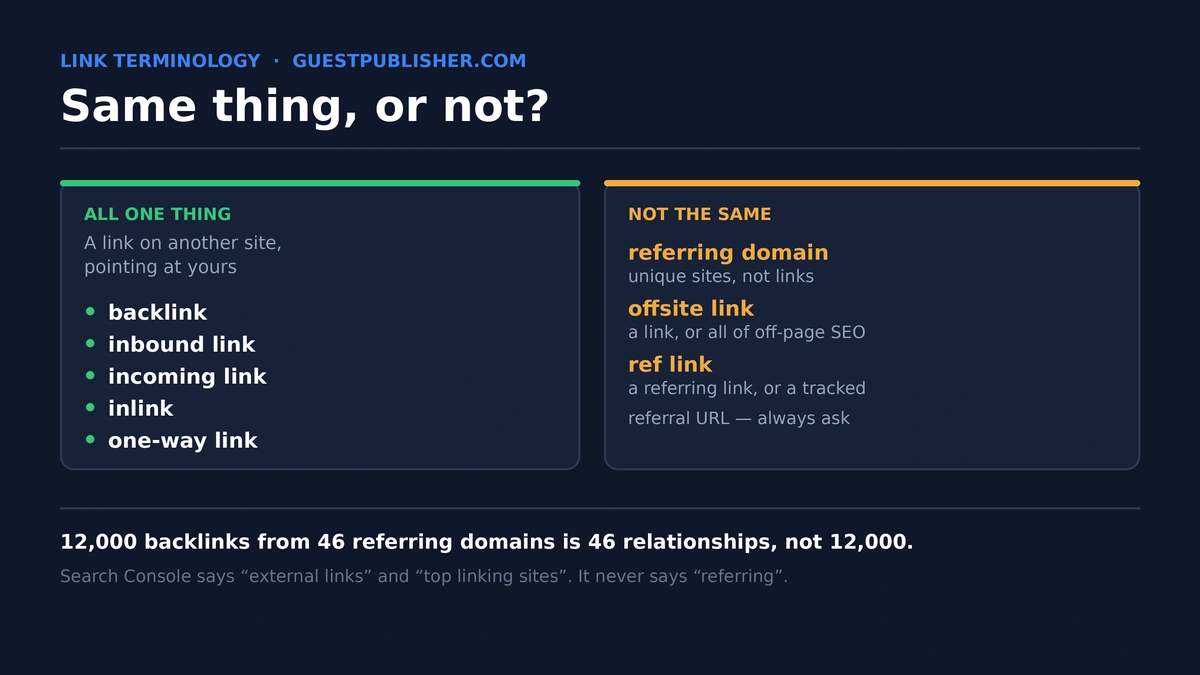
Five words describe the same thing, right up to the point where they do not.
Backlinks. Inbound links. Incoming links. Referring links. Offsite links. Every SEO article you read will tell you these are synonyms, and for three of them that is true. For the other two it is not, and the difference matters the moment you open a tool and try to reconcile two numbers that should match and do not.
This article sorts the vocabulary out properly — which terms are genuinely interchangeable, which are not, and why your Search Console figure and your Ahrefs figure will never agree.
The part everyone gets right
Start with what is actually simple.
A backlink is a link on someone else's website pointing at yours. An inbound link is a link on someone else's website pointing at yours. Incoming links are links on other websites pointing at yours.
So when someone asks what is an inbound link, the answer is the same sentence three times over. These three are the same object seen from the same angle. The words differ because different tools, different decades and different writers settled on different vocabulary. When people ask what are inbound links, the honest answer is: backlinks, with a different name on the label.
You will also meet inlinks and one-way links, which mean the same thing again. One-way links carries one extra implication — that nothing goes back the other way — but structurally it is still an incoming link.
So anyone comparing backlinks and inbound links as though they are two categories has misunderstood the question. Backlinks and inbound links are one category with two names. There is no difference. The inbound links vs backlinks debate is a vocabulary problem, not a technical one.
Put plainly: inbound links vs backlinks is not a comparison anyone needs to make. That is the easy half. Here is where it breaks.
Where the terms stop matching: the tool problem
Open Google Search Console and look at its Links report. Now open Ahrefs and look at the same site. The numbers will not match, and neither will the words.
Google's Links report does not contain the word "referring" anywhere. It gives you External links, broken into Top linked pages, Top linking sites and Top linking text, with columns called Linking page and Target URL. Google also tells you plainly that it is showing a sample rather than a complete list, that it groups data by root domain, and that it includes links it found at some point which may since have been removed (Google Search Console Help).
Third-party tools use a different vocabulary entirely: referring domains, referring pages, backlinks, lost and live links.
| What you see | Where | What it actually counts |
|---|---|---|
| External links | Search Console | Incoming links Google has found, as a sample, grouped by root domain |
| Top linking sites | Search Console | The domains sending you the most links |
| Linking page | Search Console | The specific page the link sits on |
| Backlinks | Ahrefs, Semrush, Moz | Individual links, including many from the same site |
| Referring domains | Ahrefs, Semrush, Moz | Unique websites linking to you, each counted once |
That last row is the one that causes the most confusion, so it gets its own section.
Referring links and referring domains are not backlinks
This is the distinction the glossary pages skip, and it is the only one with real consequences.
A referring domain is a unique website that links to you. A backlink is an individual link. One referring domain can produce four hundred backlinks — a sitewide footer link on a four-hundred-page website does exactly that.
This is why two sites with identical incoming links totals can be in completely different positions. A profile showing 12,000 backlinks from 46 referring domains is not strong. It is 46 relationships, several of which are producing links on every page of their site. A profile showing 900 backlinks from 700 referring domains is far healthier, because the links came from seven hundred different decisions.
Referring links is the loose term people use for the links those domains send. It is not wrong, but it is not a precise synonym for backlinks either, because in tool language "referring" almost always points at the domain-level count.
When you are judging your own profile, or someone else's report, the number that matters is referring domains. Anyone quoting only a backlink count is quoting the number that is easiest to inflate.
Offsite links: two meanings, both in use
Offsite links is ambiguous, and which meaning applies depends entirely on who is speaking.
In the first sense, offsite links means exactly what incoming links means: links living on other websites that point at you. This is the usage most link building articles assume.
In the second sense, offsite links belongs to the phrase off-site SEO or off-page SEO — everything affecting your rankings that does not happen on your own pages. That is a broader category: links, yes, but also brand mentions, reviews and citations.
Neither usage is incorrect. But if an agency proposal promises "offsite links", ask which it means, because one is a deliverable and the other is a department.
"Ref link" is the genuinely dangerous one
Of all the terms here, ref link is the one most likely to cause an actual misunderstanding between two people in a meeting, because it has two completely unrelated meanings.
In SEO conversation, a ref link is shorthand for a referring link — an incoming link from another site.
In marketing and ecommerce, a ref link is a referral link: a tracked URL carrying a parameter like ?ref=yourname, used for affiliate programmes and referral schemes. It identifies who sent the visitor. It is a tracking mechanism, not a ranking signal, and such links are very often marked rel="sponsored" or rel="nofollow" precisely because they are commercial.
Two people can agree to "add some ref links" and mean entirely different projects. If the term comes up, ask which one is meant before anyone starts work.
Direction: inbound, outbound, internal
Worth fixing in one short section, because inbound vs outbound links is the pair people confuse most, and the three directions are constantly swapped.
Inbound points at you, from somewhere else. These are the incoming links this whole article is about, and the only category you cannot create yourself.
Outbound points away from you, from your page to another site. You control these completely. Linking out to good sources is normal, healthy and costs you nothing.
Internal points from one of your pages to another of your pages. You control these too, and they are the most underused asset most sites have, because they decide how authority moves around once it arrives.
A quick way to keep it straight: inbound links are earned, outbound links are given, internal links are arranged.
Why the distinction actually matters
People searching for types of backlinks are usually really asking this: which of these words change what I should do? Three places where getting the vocabulary wrong costs you something real, and all three involve miscounting incoming links.
Reading a report. An agency quoting backlinks rather than referring domains may be reporting one sitewide link four hundred times. You cannot tell from the headline number, and the headline number is usually the one on the slide.
Buying placements. If you pay for ten links and they arrive from three websites, you bought three referring domains. Whether that is what you wanted depends on the brief, and most briefs never say.
Checking your own site. Search Console's sample and your tool's index will always disagree, because they are built differently and count differently. Neither is lying. Use Search Console to confirm Google has seen a link, and the third-party tool to see the shape of the profile over time.
How to build inbound links to your website
Having sorted the words out, the practical question remains the same whatever you call them. People searching how to build inbound links to your website are asking one thing: how do other sites end up pointing here?
Four routes, in rough order of durability.
Publish something worth citing — original data, a tool, a genuinely better explanation of a hard subject — then tell the people who write about that subject it exists. Slow, and the links last.
Write for publications your buyers already read, which is the most reliable method available to most businesses because it does not depend on anyone discovering you first. Our guide to guest posting outreach covers the process end to end, and if you would rather hand it over, that is what an seo outreach service does.
Buy placements deliberately, with the traffic and link type visible before you commit rather than after. Every listing on our guest post marketplace shows Domain Authority, Domain Rating, monthly organic traffic, traffic country and link type up front, and our guest post cost calculator prices them by authority level.
Earn them through relationships — being quoted, being the person journalists call, appearing in roundups. The slowest route and the one that compounds hardest.
What does not work, whatever anyone sells you: bulk packages that produce thousands of incoming links from a handful of domains. Reread the referring domains section and you will see why those numbers look impressive and mean nothing.
Quick reference
| Term | Means | Same as backlink? |
|---|---|---|
| Backlink | A link from another site to yours | — |
| Inbound link | A link from another site to yours | Yes |
| Incoming links | Links from other sites to yours | Yes |
| Inlink / one-way link | A link from another site to yours | Yes |
| Referring domain | A unique site linking to you | No — counts sites, not links |
| Referring link | Loose term for a link from a referring domain | Roughly, but tools use it at domain level |
| Offsite link | Either an incoming link, or all of off-page SEO | Depends who is speaking |
| Ref link | A referring link, or a tracked referral URL | Often not a ranking link at all |
| Outbound link | A link from your page to another site | No — opposite direction |
| Internal link | A link between two of your own pages | No — same site |
If you take one thing from this: what are inbound links, what are backlinks and what are incoming links all have the same answer, referring domains are a different and better number, and "ref link" should always be queried before anyone acts on it.